
Your own invoice design
An invoice is a calling card too
In the invoice designer you decide how your invoice looks: your logo, your colours, your typography and which blocks go where. You see straight away how the PDF arrives at your customer, so there is no surprise only after you have hit send.
What you can do with it
- Match logo, colours and typeface to your own brand.
- Decide which fields appear on the invoice: reference, project number, purchase order number, payment term.
- You type and drag in the document itself, so you see exactly what you are doing.
- Keep several designs, for instance one for business and one for private customers.
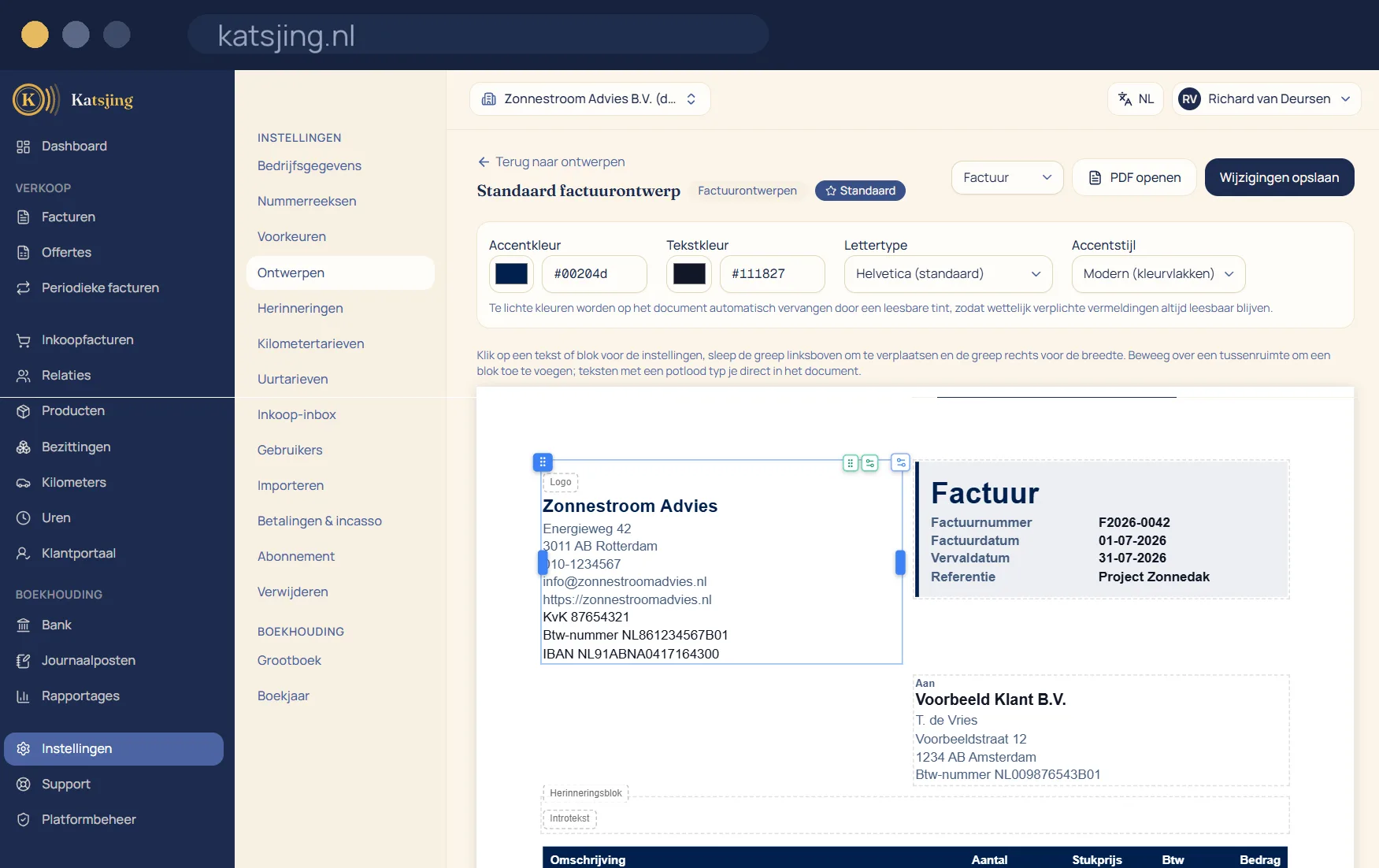
You see the real invoice while you design
The designer shows your invoice with real details, not with empty boxes. You place fields in a twelve-column grid in the header, the body or the footer of the page, and choose from more than twenty typefaces and your own colours. Text can never overlap other text, and a colour too light to read gets adjusted. What you see is exactly the PDF your customer receives.
What is required stays put
Some details have to be on an invoice, however beautiful your design: your name, your Chamber of Commerce (KvK) number and VAT ID, your customer's details, the invoice number and date, the VAT per rate and the total, and where needed the “VAT reverse-charged” or small businesses scheme notice. You can move and style those fields, but not remove them. If you remove one by accident, Katsjing puts it back.
Several designs, several names
Make one design for invoices and one for quotes, or a businesslike and a more cheerful version, and choose per document which one you use. If you work under more than one trading name, each name gets its own logo, design and number series. And your invoice goes out in your customer's language: Katsjing knows eleven document languages and, for Polish, Turkish, Romanian and Ukrainian, automatically picks a typeface that shows every character correctly.
Frequently asked questions
- How many trading names can I use?
- One on the free plan, two on ZZP and as many as you like on Onderneming. Your Chamber of Commerce number, VAT ID and IBAN stay the same for all names, because they belong to your business.
- Can I put a separate postal address on the invoice?
- Yes. Besides your business address you can enter a postal address or PO box, which only appears on your invoices and quotes.
- Does the payment QR code stay scannable if I make it smaller?
- Yes. The QR code has one size and always stays square, so a banking app can read it.
Useful alongside this
Create an invoice for freeIncluded in every paid plan
There is no basic version with half a feature list: every feature above is included in both paid plans. What differs is how much of it you use: the number of sales invoices per month, users, trade names and automatically read receipts. ZZP is for sole traders; Onderneming has room everywhere and lets you switch off the Katsjing mention on your invoices. You can also start for free, with a monthly limit on the number of invoices.
See the plans