
The check grid
See which purchase invoice is missing
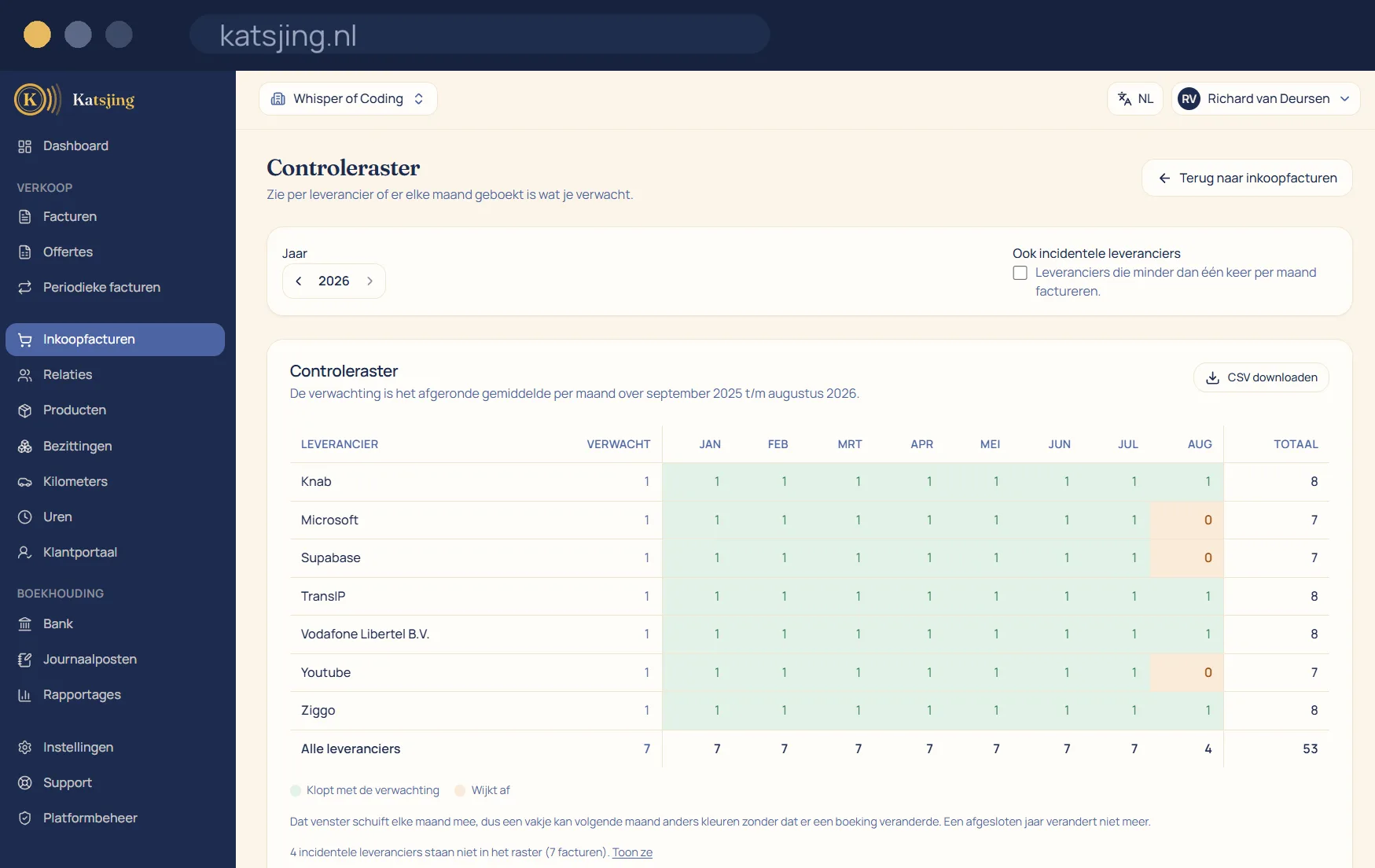
Hosting, phone, insurance, subscriptions: those are the invoices you forget to enter, because nothing chases you for them. The check grid puts all your suppliers underneath each other with the months of the year alongside, and colours each cell green when what you expected has been entered and amber when it deviates.
Katsjing does not invent that expectation: it is the rounded monthly average over the past twelve months for that supplier. So one amber cell in this month's column is precisely the invoice still sitting in your inbox.
What you can do with it
- Per supplier per month the number of purchase invoices entered, with a total per month and per year.
- Suppliers who invoice less than once a month stay out of the grid by default and are one checkbox away.
- The grid downloads as CSV, so you can lay it next to your bank statement.
- The twelve-month window moves along, so a cell can change colour next month; a closed financial year no longer changes.
See which receipt is missing, too
Besides the grid with the number of invoices per supplier, the check grid has a second view: booked purchase invoices without a receipt or PDF attached. There should be a zero everywhere there. Every cell that isn't zero is an entry whose evidence you still have to add, and you must be able to show that evidence for seven years.
An expectation that grows with you
What Katsjing expects per supplier is the rounded average of the past twelve months. So it works in January too, and adjusts by itself when a supplier starts invoicing more or less often. A cell only deviates when the number is really different; there is no margin that would hide a missed invoice.
A check, not an entry
The check grid only counts: it books nothing and calculates no amounts. It is a tool to see quickly at the end of the month or before your VAT return whether everything has come in. Want to lay the grid next to your bank statement? Download it as CSV.
Frequently asked questions
- Does the grid also check that my invoice numbers are sequential?
- No, the grid is about your purchases. Your own invoice numbers in Katsjing run on automatically and without gaps anyway.
- Why is a supplier not in the grid?
- Suppliers who invoice less than once a month are left out by default, otherwise the grid would be full of amber cells. One checkbox brings them in.
- Does the grid work for earlier years?
- Yes. You choose the year at the top, and a closed financial year no longer changes.
Included in every paid plan
There is no basic version with half a feature list: every feature above is included in both paid plans. What differs is how much of it you use: the number of sales invoices per month, users, trade names and automatically read receipts. ZZP is for sole traders; Onderneming has room everywhere and lets you switch off the Katsjing mention on your invoices. You can also start for free, with a monthly limit on the number of invoices.
See the plans